
Quick HTML and Markdown by soph_k
First, this isn’t guide for writing HTML or for Markdown formatting. This is a guide on how to use them in the Isekai Zero platform use case.
Now, to the guide itself.
When you were writing one of your characters or storylines you might have seen this in the player-facing prompt:
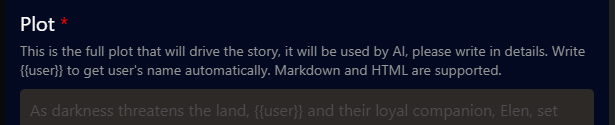
Which means that you can use Markdown to make your prompt generally more legible, or use HTML to make this:
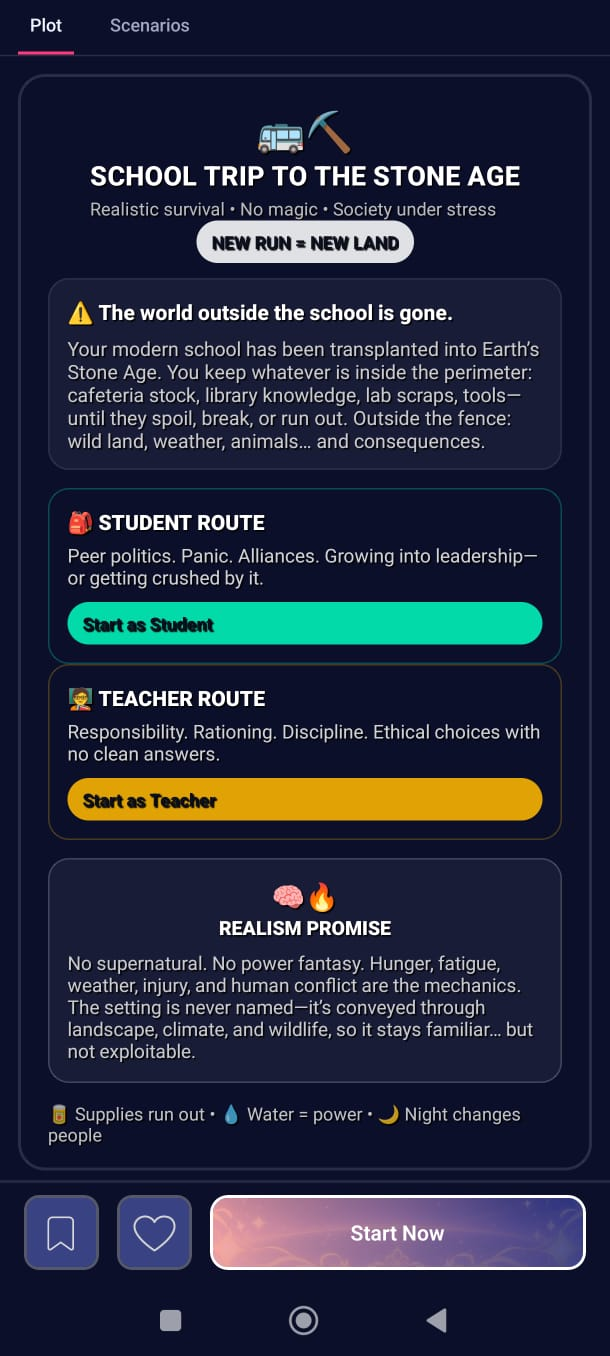
One important thing to note is that both markdown signs and HTML code counts as tokens, and the HTML code can cost a LOT of tokens. So, only use HTML when you have an AI-facing prompt that is separate from the player-facing one.
When the prompts are separated like that, the player-facing plot is not read by the AI, and its tokens don’t count for the cost of the storyline or character. It’s just fluff for the eye of the potential player, to attract them to your story.
Markdown
Markdown is a tool to make text more easily legible. It can be used for the player-facing plot, but it’s not nearly as flashy as HTML. Still, if you can’t get yourself to code some HTML, it’s better than not having anything.
But the place where I personally use Markdown is in the AI-facing prompts, like the prompt plot and the guideline. But with a caveat.
Using Markdown in those places has a big pro and a big con. It makes the text more legible, making it a lot easier to find and edit information later when the thing becomes too big. On the other side, each markdown char is a new token to be accounted for, increasing the cost.
I like to make my text easily legible for me, and my prompts often spiral into big chunks, so I often have to deal with that pain.
So, I always write with Markdown, it makes things easier for me to navigate while I’m reading. At the end, before publishing, I check the token cost. If it spiralled, I paste the text to a google doc and use the find and replace tool to replace all the * and # for empty characters.
The final result ends up looking something like this:
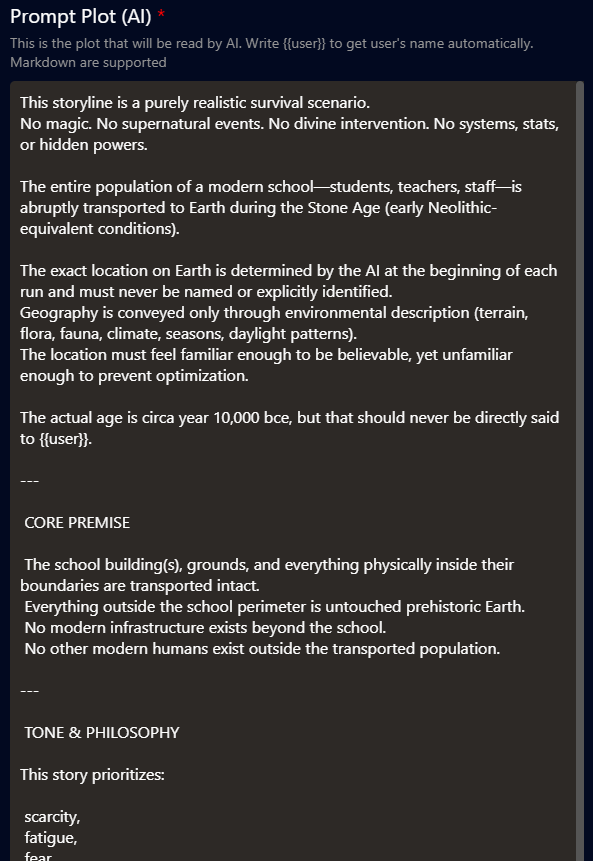
That makes things still easy to navigate, better than a wall of text with long paragraphs.
HTML
Coding by Hand or Vibes
This isn’t a complex website or a system with security issues. It’s just a box that makes a bit of text look flashy.
You can code it by hand, and that’s alright, but you don’t need to. This day and age, you don’t even need to fully understand html before doing it - though understanding how it works will make your life a lot easier when things go south.
Coding all those colors and formatting by hand might be tiresome and time-consuming. Today, there are several tools to help you with that so you can focus your energy in creating interesting stories.
As for myself, I use Figma to design and then get ChatGPT to do the coding. You can find the workflow and tools that suit you best.
Body vs Div
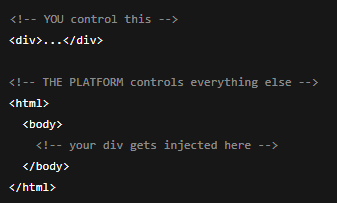
The Isekai Zero platform is not a full HTML document renderer.
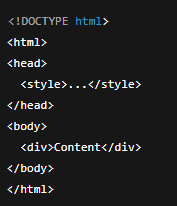
It does not parse <!DOCTYPE html>, <html>, <head>, or <body>.
Instead, it injects whatever you write inside an existing page that already has its own <html>, <head>, and <body>.
So, when you include those tags yourself, the renderer just breaks.
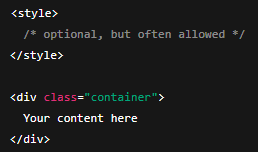
So your content must star with a container element <div> and assume the page already exists.
Think of it as:
|
❌ Will break or be ignored: |
✅ What the platform expects:
|
Important nuance:
The embedded renderer still allows:
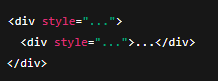
In the end, the safest structure is as follows:
Line Breaks and Capsules
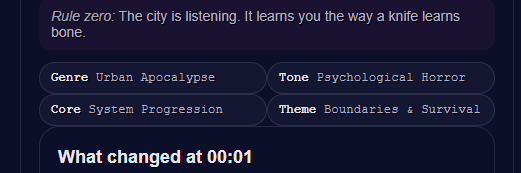
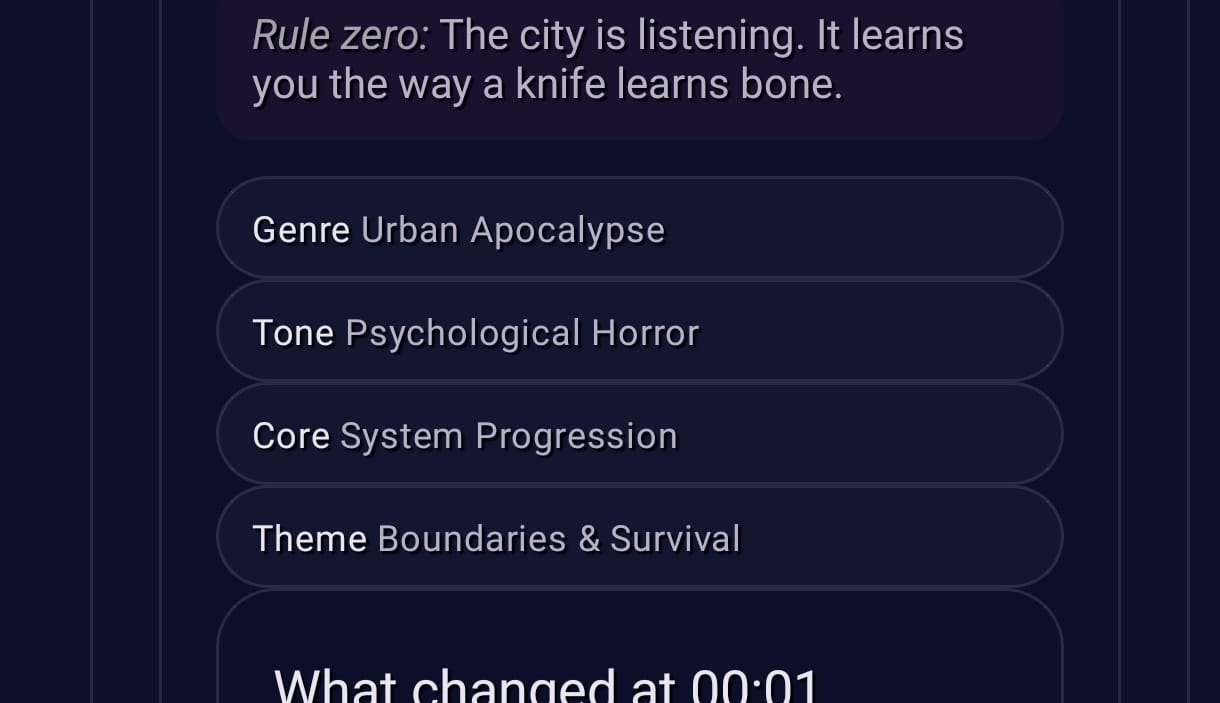
The embedded renderer might be a bit iffy with line breaks in some conditions, especially when working with groups of capsules.
For example, this case:
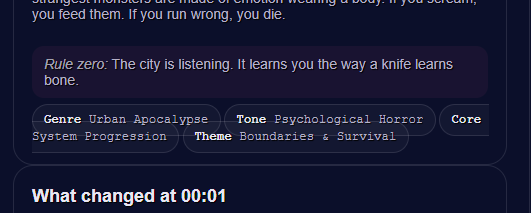

The first is on the PC browser viewing, the second is on the mobile app.
This happens when the renderer doesn’t honor the layout rules reliably.
I solved it by switching the pills from <span> to <table> cells, which are more stable.
This was the result in PC and mobile:
PC vs Mobile (and the problem I’m still to solve)
You probably noticed that the way things work (and break) in PC and mobile are different.
So you should always check the look on your HTML on both platforms, before pushing the public upload.
For example, there’s an issue in the example I showed at the beginning of this article, that only shows up on PC:
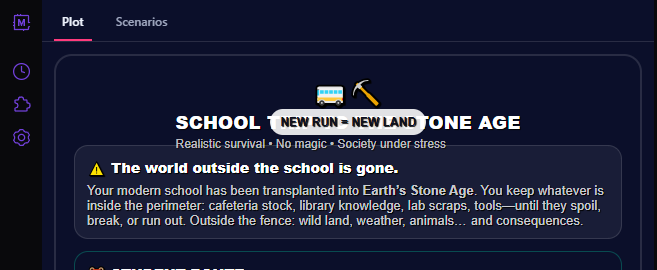
If I had only looked at the Mobile version, I would’ve never seen the problem. I haven’t sat down to find and fix the source of the bug yet, so I can’t explain it here at the moment, but let it serve as a reminder to always check on both platforms.
An HTML Example
Here goes the code of the example I showed above, including the issue I haven’t solved yet:
|
<div style="background:linear-gradient(135deg,#0b1020 0%,#1b2a3a 45%,#2a1b3a 100%);border:2px solid rgba(255,255,255,.12);border-radius:18px;padding:18px 18px 14px;box-shadow:0 10px 28px rgba(0,0,0,.35);font-family:system-ui,-apple-system,Segoe UI,Roboto,Arial;line-height:1.25;"> <div style="display:flex;align-items:center;gap:10px;margin-bottom:10px;"> <div style="font-size:26px;">🚌⛏️</div> <div style="flex:1;"> <div style="font-size:18px;font-weight:800;color:#ffffff;letter-spacing:.2px;"> SCHOOL TRIP TO THE STONE AGE </div> <div style="font-size:12px;color:rgba(255,255,255,.72);margin-top:2px;"> Realistic survival • No magic • Society under stress </div> </div> <div style="font-size:12px;font-weight:700;color:#0b1020;background:rgba(255,255,255,.88);padding:6px 10px;border-radius:999px;"> NEW RUN = NEW LAND </div> </div> <div style="background:rgba(255,255,255,.06);border:1px solid rgba(255,255,255,.12);border-radius:14px;padding:12px 12px 10px;margin-bottom:12px;"> <div style="color:#fff;font-weight:800;font-size:14px;margin-bottom:6px;"> ⚠️ The world outside the school is gone. </div> <div style="color:rgba(255,255,255,.78);font-size:13px;"> Your modern school has been transplanted into <b>Earth’s Stone Age</b>. You keep whatever is inside the perimeter: cafeteria stock, library knowledge, lab scraps, tools—until they spoil, break, or run out. Outside the fence: wild land, weather, animals… and consequences. </div> </div> <div style="display:grid;grid-template-columns:1fr 1fr;gap:10px;margin-bottom:12px;"> <div style="background:linear-gradient(135deg,rgba(0,255,194,.16),rgba(0,153,255,.10));border:1px solid rgba(0,255,194,.25);border-radius:14px;padding:12px;"> <div style="font-weight:900;color:#ffffff;font-size:14px;margin-bottom:4px;">🎒 STUDENT ROUTE</div> <div style="color:rgba(255,255,255,.82);font-size:12.5px;"> Peer politics. Panic. Alliances. Growing into leadership—or getting crushed by it. </div> <div style="margin-top:8px;font-size:12px;font-weight:800;color:#0b1020;background:rgba(0,255,194,.85);display:inline-block;padding:6px 10px;border-radius:999px;"> Start as Student </div> </div> <div style="background:linear-gradient(135deg,rgba(255,183,0,.16),rgba(255,0,122,.10));border:1px solid rgba(255,183,0,.25);border-radius:14px;padding:12px;"> <div style="font-weight:900;color:#ffffff;font-size:14px;margin-bottom:4px;">🧑🏫 TEACHER ROUTE</div> <div style="color:rgba(255,255,255,.82);font-size:12.5px;"> Responsibility. Rationing. Discipline. Ethical choices with no clean answers. </div> <div style="margin-top:8px;font-size:12px;font-weight:800;color:#0b1020;background:rgba(255,183,0,.88);display:inline-block;padding:6px 10px;border-radius:999px;"> Start as Teacher </div> </div> </div> <div style="background:rgba(255,255,255,.06);border:1px dashed rgba(255,255,255,.22);border-radius:14px;padding:12px;margin-bottom:12px;"> <div style="display:flex;align-items:center;gap:8px;margin-bottom:6px;"> <div style="font-size:18px;">🧠🔥</div> <div style="font-weight:900;color:#ffffff;font-size:13px;">REALISM PROMISE</div> </div> <div style="color:rgba(255,255,255,.78);font-size:12.5px;"> No supernatural. No power fantasy. Hunger, fatigue, weather, injury, and human conflict are the mechanics. The setting is <b>never named</b>—it’s conveyed through landscape, climate, and wildlife, so it stays familiar… but not exploitable. </div> </div> <div style="display:flex;gap:10px;flex-wrap:wrap;align-items:center;justify-content:space-between;"> <div style="color:rgba(255,255,255,.75);font-size:12px;"> 🥫 Supplies run out • 💧 Water = power • 🌙 Night changes people </div>
</div> </div> |
About The Writer:
Sophia Kramer is an Anthropologist, Game Developer, Writer of Yuri Isekai Slop Web Novels, and Content Creator in Isekai Zero
soph_k at Isekai Zero (https://www.isekai.world/creator/693d5149258255bb9b21f0f5)
Novels: The Girl Who Hacked The Magic System, Dead Nerds Society, Metropolis in Ruin (coming now in January!)