
CHARACTER CREATION GUIDE
Character Creation Guide: Step-by-Step Tutorial for New Users
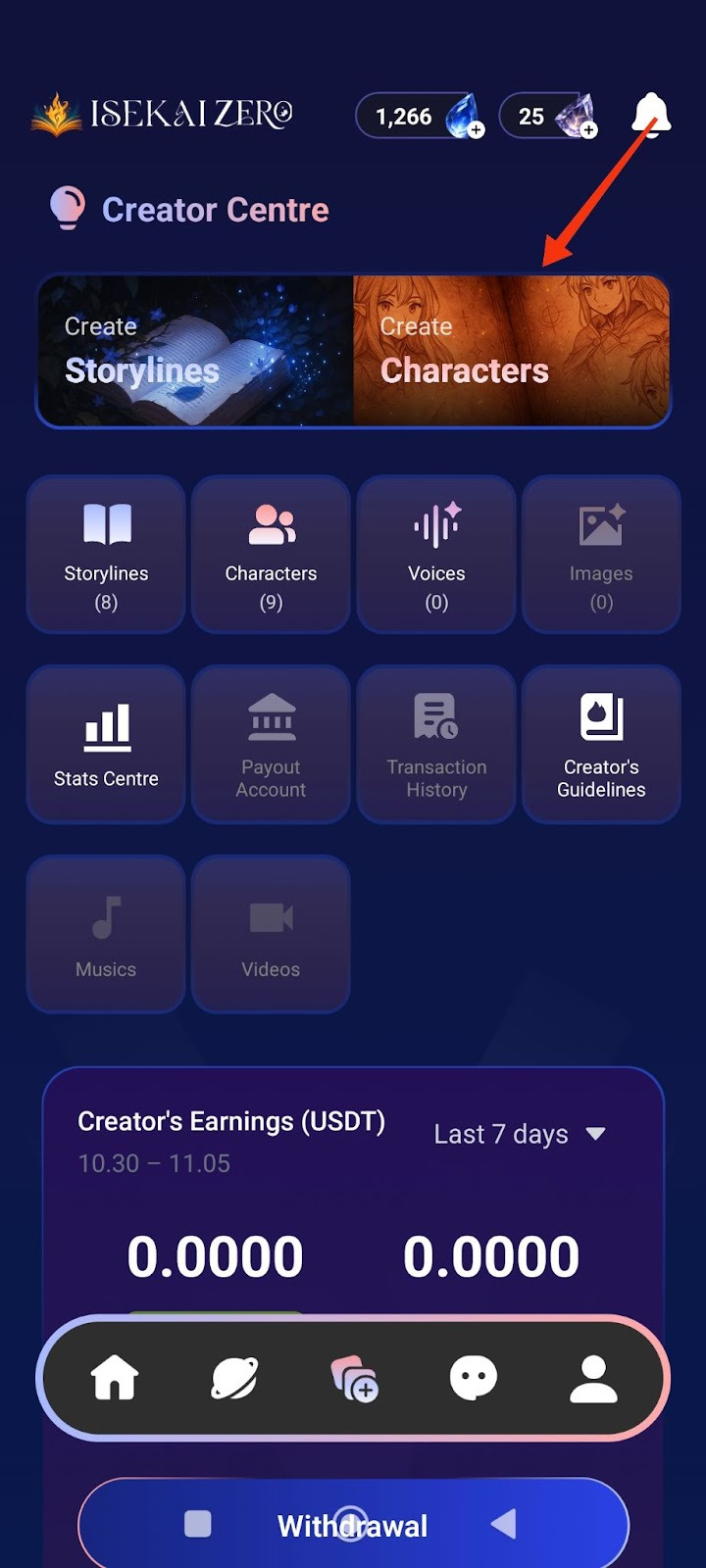
Step 1: Access the Creator Centre
- Open the Isekai Zero app
- Tap on the Creator Centre section
- You'll see two main options at the top.
- “Create Characters” is on the right
- Tap on "Create Characters"
Step 2: Add a Cover Image
*Compulsory for Public Storyline
**Optional for Private Storyline
The Create Characters screen will open. At the top, you'll see:
- A placeholder to add image
- To add a cover image:
- Tap the "+ Photo / Video" button
- Select an image from your gallery
- The first image will be the thumbnail for your Characters
Step 3: Select Language
- Find the "Language" dropdown
- Tap to select the language you'll be writing in
Step 4: Enter Character Name ⚠️ (Required)
- Find the "Name" field
- Type your character's name
- Example: "Yunari, Kuro, Sora"
Step 5: Write Description Summary (Optional)
- Find the "Description Summary" field
- Read the instructions.
- Write a short, catchy description (30 words or less)
- Example: "She is a lively person."
- This is shown to users browsing characters
Step 6: Write Full Description
- Scroll down to the "Description"
- Read the instructions.
- Write complete character details
- Important tips:
- Write {{user}} wherever you want the player's name to appear
- Be detailed - the AI uses this for roleplay
- The more details you include, the better the AI will roleplay your character.
- Consider adding: Full name, age, gender, height, ethnicity, nationality, occupation, status, speech style, appearance, personality, likes, dislikes, fears, hobbies, backstory, etc.
Step 7: Add Character Tags (Optional)
- Tap the
 icon on the right
 - Add relevant tags to help users find your Characters
- Examples: demon, angel, female, loyal
Step 8: Configure Advanced Mode (Optional)
- Find the "Advanced Mode" toggle switch
- When ON (green): The character description displayed to users can be different from what the AI reads
- When OFF (gray): The same character description is used for both AI and users
- Leave it ON if you want different versions
Step 9: Configure Secret Mode (Optional)
- Find the "Secret Mode" toggle switch
- When ON: Hides the AI prompt from users
- When OFF: Users can see the prompts
- Choose based on your preference
Step 10: Write Prompt Description (AI) (Optional)
- This is specifically what the AI will read to generate responses
- Write detailed instructions for how the AI should handle the character
- Use {{user}} for the player's name
Step 11: Add Example Dialogues (Optional)
- Write sample dialogue showing your character's speech style and personality
- Include both narration and dialogue
Step 12: Add Voice (Optional)
- Find the "Voice" section
- Tap the icon on the right
- Upload or link a voice file for your character
- This adds audio when character speaks in visual novel mode

Step 13: Choose Visibility Settings
- Scroll down to "Visibility" section
- Tap the dropdown (shows "Private" by default)
- Select from three options:
- Private: Only you can see it
- Unlisted: Anyone with the link can access it
- Public: Everyone can find and play it
Important Note for Public Characters:
If you select Public visibility, your character will be submitted for review before it becomes publicly available.
- Review time: 2-3 working days
- During review: Your character will remain private/hidden
- After approval: It will appear in public listings for all users to discover
- You will be notified once the review is complete
- Your character will be automatically translated into 10 languages, making it accessible to players worldwide.
💡 Tip: If you want to play with the character immediately, choose Private or Unlisted first. You can always change to Public later.
Step 14: Save Your Character
- Scroll to the bottom of the page to tap the large "Save Character" button OR tap the on the top right of the page.

- Your character is now saved!
Note: You can update your published storylines and characters at any time, but all changes require re-approval (1-3 working days) before going live.
Public Content Quality Standards
Review Process
All storylines and characters submitted for Public visibility are reviewed to ensure they meet our content guidelines and quality standards.
Important Notice
- Following our Content Creation Policy doesn't automatically guarantee approval.
- Even if your storyline and characters complies with all content guidelines, it may still be rejected if it shows insufficient effort or lacks basic detail.
What We're Looking For
Quality and polished content is always appreciated, but we recognize that experience levels vary and we know everyone starts somewhere. What we are really looking for is genuine thought and effort behind your content.
Your storyline and character should have:
✅ Reasonable detail - Enough information for players to understand the setting and characters
✅ Clear premise - Players should know what to expect from your storyline/character
✅ Basic completeness - Character traits, storyline setup, and relevant context included
✅ Genuine effort - Shows you've spent time developing your idea
We understand:
- Not everyone is a professional writer
- You're still learning and improving
- Creative styles vary
❌ WHAT GETS REJECTED
Content that shows minimal to no effort, such as:
- Extremely vague descriptions (1-2 sentences with no detail)
- Empty or placeholder text
- No character background or personality
- Unclear or missing storyline premise
- Obviously rushed or incomplete submissions
✅ WHAT GETS APPROVED
Content that shows genuine effort, even if not perfect:
- Detailed enough for players to understand the story
- Clear character personalities and backgrounds
- Understandable storyline setup and goals
- Proper categorization and tags
- Shows you've thought about your creation
Remember: We are looking for effort and care!
Quick Examples
❌ Too Minimal (Likely rejected):
Character: Warrior
Description: Fights
Storyline: Battle
This shows no effort or detail.
✅ Sufficient Effort (Likely approved):
Character: Captain Reylan
Description: An experienced mercenary captain who's tough but fair.
She leads a small group of fighters and takes on dangerous jobs.
She's loyal to her crew but haunted by a past mission gone wrong.
Storyline: Captain Reylan is hired to escort medicine through
dangerous territory during a plague outbreak. Things get complicated
when she suspects the plague might not be natural.
Not perfect, but shows clear effort and gives players enough to work with.
If Your Content is Rejected
Don't worry! Rejection doesn't mean your idea is bad.
You'll receive:
- Reason for rejection
- Guidance on what needs improvement
You can:
- Add more details and resubmit
- Expand character backgrounds
- Keep it Private/Unlisted instead
Note: Storylines and characters with images unrelated to the content will be rejected. Ensure your images match your storyline theme and character descriptions.
Most rejections are easily fixable with a bit more detail!
Bottom Line
Put some thought into your creation, give players enough detail to enjoy the story, and you'll be fine.